Earthquake Network
- 4.2
- Rating
- 10.00M
- Installs
- Free
- Price

 Analysis by App-foxy
I came away from Earthquake Network with a clear impression: it is most useful as an extra layer of awareness, not as something I would trust as my only emergency warning system. The app turns a phone into a practical earthquake-monitoring tool, and that makes it unusually relevant for people who live in seismic areas, travel often, or simply want a faster way to learn when shaking has been reported nearby.
What makes it appealing is the directness of its purpose. This is a free communication app from Futura Innovation SRL, focused on real-time earthquake alerts rather than social chatting, media, or general weather information. It has been available since December 19, 2012, and its long presence is reflected in a 4.2 average from around 174 thousand ratings, with more than 10 million installs. Those figures suggest that it has become a familiar option for people who want earthquake information close at hand.
How Earthquake Network feels in everyday use
The first thing I like is that the app gives earthquake information a dedicated place on my phone. Instead of waiting for a news report or searching the web after feeling a tremor, I can open a focused tool built around seismic events. That difference sounds small, but in a stressful moment, removing extra steps matters.
You May Also Like

 Blood Strike: 2.5 Anniversary
Blood Strike’s Loadouts Turn Every Drop Into a Tactical Gamble
A close look at Blood Strike’s custom loadouts: how fast access to signature weapons reshapes its battle royale rhythm, rewards preparation, and narrows the gap between fights.

 Pandora - Music & Podcasts
Pandora’s Music Is Easy to Start, but Harder to Recover
Pandora’s strength is its low-effort path from a seed to a station. Its weak spot is how much confidence it asks you to place in connection, setup, and quiet recovery.

 8 Ball Pool
 Is Built on Rivalries, Rematches, and Routine
A close look at the rivalries, rematches, shared routines, and unanswered safety questions that turn a quick pool match into a persistent mobile community.

 Samsung Music
’s Quiet Strength Is Playing What You Already Own
Its reach comes less from spectacle than from dependable access to a personal library. That simplicity is both the app’s strongest retention engine and its ceiling.

 AccuWeather: Weather Radar
AccuWeather Review: A Quick, Clear Forecast for Everyday Decisions
For everyday plans, the best forecast is the one you can understand quickly. AccuWeather makes rain timing, radar, and local conditions easy to act on, with a few trade-offs.

 Hill Climb Racing
Why Hill Climb Racing Still Turns Crashes Into One More Run
A tiny car, a bumpy hill and one more upgrade: Hill Climb Racing keeps resurfacing because its simple chaos makes every near-miss feel personal.
More From Our News Desk



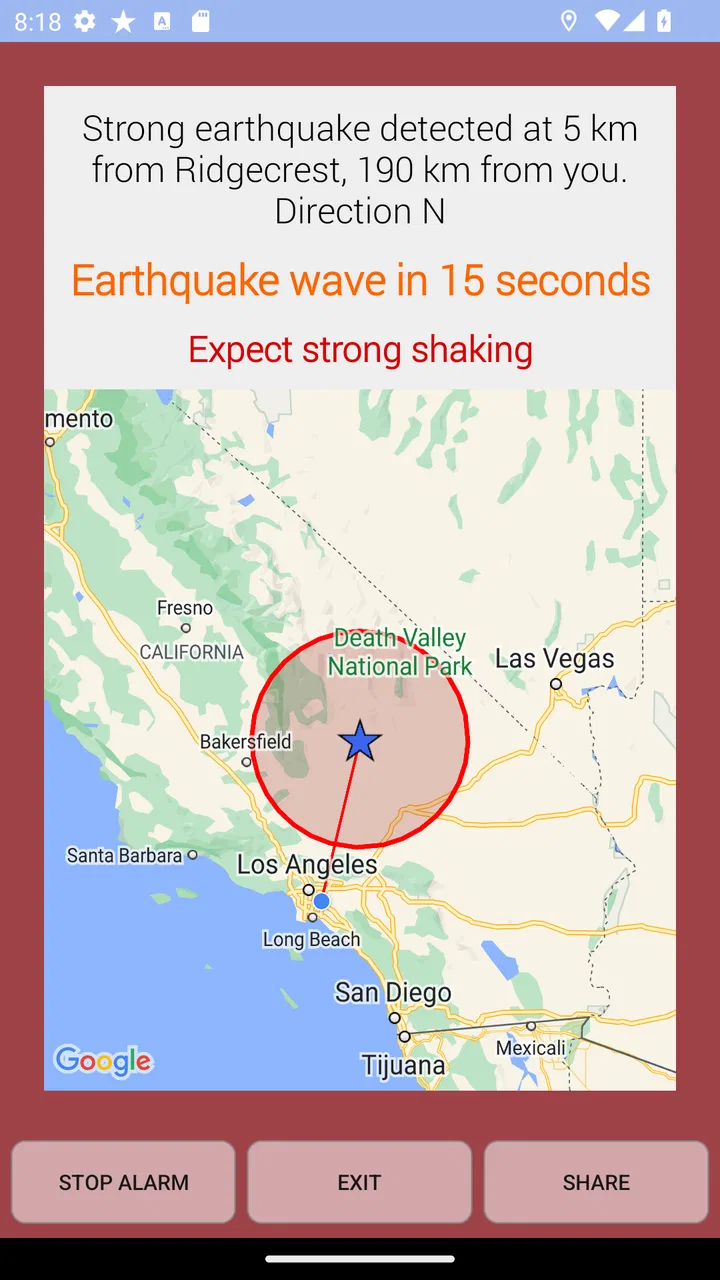
The app’s central promise is real-time earthquake alerts on a smartphone. I see that as a practical complement to official channels, not a replacement for them. An alert can help me understand whether a sensation was local shaking, a passing vibration, or something reported across a wider area. It can also help me check the situation when I am away from home and do not immediately know what happened.
One realistic use case is a person living in an apartment who feels a short jolt while working from home. Rather than immediately calling several relatives or scrolling through unrelated posts, that person can check the app for earthquake activity and use the information to decide whether to move away from windows, check on neighbors, or follow local emergency instructions. The app does not remove the need for judgment, but it can shorten the time between feeling something and finding relevant context.
I also find the communication angle important. Earthquakes create confusion because people often experience the same event at different times and with different intensity. A dedicated alert tool can give a household a shared reference point. If one family member is outside and another is indoors, both have a way to check whether an event has been reported rather than relying only on scattered messages.
That said, the experience depends heavily on how the phone is configured and how quickly information reaches the device. I would not assume that every alert arrives before shaking, or that every earthquake will be identified instantly. Network conditions, phone settings, location context, and the event itself can all affect usefulness. The sensible approach is to treat notifications as helpful information, while keeping official emergency guidance and basic preparedness habits in first place.
The strongest reason to install it
For me, the strongest case is convenience during uncertainty. Earthquake Network is not trying to be a full disaster-management suite, and that narrow focus works in its favor. When I want earthquake-related information, I do not have to sort through forecasts, headlines, or general-purpose alert feeds first.
That focus also makes it suitable for people who are new to an earthquake-prone region. Someone moving to a different city may not yet know which local sources residents normally use. Installing a dedicated earthquake app gives that person a starting point while they learn the official systems, evacuation routes, and building procedures that matter more in a serious emergency.
Travelers can benefit in a similar way. If I am visiting a region where earthquakes are more common than at home, I may not know the local language well enough to search quickly after a tremor. A specialized app can be easier to understand than trying to interpret several unfamiliar news sources. It is especially useful as a background tool for checking whether an event has been noticed nearby.
Another strength is that the app is free to install. That lowers the barrier for households that want a basic earthquake alert option without committing to a subscription immediately. The age rating is Everyone, so it can fit into a family’s general emergency-preparedness setup, although younger users should still be taught what to do after an alert instead of being left to interpret it alone.
The current version is 26.7.23, and the minimum operating-system requirement is Android 6.0. That makes the app accessible on many older Android phones, which is useful because emergency tools should not be limited only to people with recent hardware. I would still keep the phone updated where possible and test notification behavior before relying on it, since an installed app is only useful if alerts can actually reach the user.
Small setup choices that make a real difference
My first practical tip is to review notification behavior immediately after installation instead of assuming the default settings are ideal. A phone may silence alerts during certain modes, restrict background activity, or treat the app as low priority. For an earthquake tool, I would check notification permissions, sound settings, battery restrictions, and any bedtime or focus mode that could hide an urgent message.
My second tip is to decide in advance what an alert means for your household. The notification itself is not a safety plan. I would agree with family members on simple actions: stay away from glass, protect yourself during shaking, know where exits are, and check official instructions afterward. This prevents the common mistake of treating an alert as an invitation to rush outside without thinking about falling objects or damaged structures.
A third useful habit is to use the app for verification, not rumor collection. After a tremor, social networks can fill with dramatic claims before reliable details are available. I would check Earthquake Network for a focused signal, then compare important decisions with local authorities or emergency services. That two-step workflow is more dependable than forwarding an unverified message simply because it appeared first.
It is also worth remembering that a phone carried in a bag, left on silent, or disconnected from mobile data cannot provide the same practical benefit as a phone that is nearby and able to receive notifications. I would not install the app on an unused tablet in another room and assume that solves the problem. Placement, connectivity, and attention still matter.
Where the experience becomes less reassuring
The meaningful weakness is that real-time earthquake information can be easy to overinterpret. The wording of an alert may feel more precise than the underlying situation really is, especially when a user is frightened. An alert tells me that an event has been detected or reported; it does not automatically tell me whether my building is safe, whether another shock will follow, or what damage exists in my street.
This limitation is not unique to this app, but it matters because the purpose is safety-related. I would be uncomfortable recommending it to someone who expects a guaranteed advance warning for every earthquake. The app should be viewed as an information aid. It cannot replace structural safety advice, emergency broadcasts, a charged phone, or a personal plan for contacting relatives.
There is also a trade-off between staying informed and becoming distracted. Frequent notifications may be reassuring for one person and stressful for another. If I lived in a region with regular minor activity, I would adjust the app’s alert approach so that useful information remains visible without making every phone sound feel like a crisis. The best setting is personal: someone with anxiety may prefer fewer interruptions, while a person responsible for a workplace may want broader awareness.
In-app purchases range from $0.69 to $23.99 per item. Since the app is free, I would begin with the basic experience and only consider an optional purchase after understanding what it changes for my own routine. A paid option is worthwhile only if it solves a specific problem, such as reducing friction or improving the way I monitor events. I would not pay simply because the subject is important; emergency value comes from dependable habits and correct interpretation as much as from extra app functions.
Another point is that an earthquake alert is not the same thing as a local emergency-management notification. Official services may provide instructions tailored to a particular municipality, including evacuation information, tsunami warnings, shelter details, or road closures. Earthquake Network belongs beside those services, not above them. If I had to choose only one source during a crisis, I would prioritize the official channels responsible for my location.
Who will get the most from it
I think Earthquake Network is a strong fit for residents of earthquake-prone regions who want a dedicated way to monitor seismic activity. It is also useful for travelers, students living away from home, landlords who want a simple awareness tool for a household, and people who have previously felt an earthquake and want quicker context next time.
It can be particularly practical for someone who does not follow local news continuously. A general news app may cover a major earthquake eventually, but it is not built around the specific moment when a user wants to know whether a tremor has been detected. This app’s narrow purpose makes it easier to reach for during that gap.
I would be more cautious recommending it to someone who lives in a region with very little seismic activity and dislikes notifications. In that situation, the app may spend most of its time unused, and the user might be better served by learning the local emergency-alert system and keeping a basic preparedness checklist. I would also not recommend it as the only tool for a business, school, or care facility that needs coordinated emergency communication. Those environments require formal procedures and reliable official channels.
People who are highly sensitive to alerts should also consider how they react to uncertainty. An earthquake app can provide useful context, but it can also encourage repeated checking. I would set a clear routine: look at the alert, follow the safety plan, verify with authorities when necessary, and avoid endlessly refreshing the screen for reassurance.
How it compares with the usual alternatives
Compared with a general news app, Earthquake Network is more focused and likely to feel faster to navigate when the only question is whether an earthquake has been reported. General news services are better for broader consequences, such as transport disruption, public statements, and local reporting, but they may bury the initial event under other headlines.
Compared with social media, the app offers a calmer starting point. Social platforms are useful for seeing firsthand reports from people nearby, yet they also mix reliable observations with exaggeration, old posts, and speculation. I prefer using social media only as a secondary source after checking a dedicated earthquake tool and official information.
Compared with built-in government or carrier alerts, the app may be more convenient for people who want a specialized earthquake view, while official systems remain more authoritative for urgent instructions. The two approaches serve different purposes. One helps me monitor and understand; the other tells me what local authorities want me to do.
Compared with a weather app, the difference is obvious but still worth stating: weather tools are not a substitute for earthquake-focused monitoring. If earthquakes are part of my risk profile, I would rather have a dedicated app than assume a general-purpose forecast service covers the same need.
My verdict after weighing the trade-offs
Earthquake Network earns my recommendation as a supplementary earthquake-awareness app. Its free entry point, focused purpose, broad accessibility, and established user base make it easy to justify for people who want a dedicated source on their phone. I especially like it for residents and travelers who need quick context after feeling shaking, provided they understand that an alert is information rather than a guarantee of safety.
My recommendation comes with one firm condition: pair it with official emergency notifications and a simple household plan. Check the phone’s notification and battery settings, decide how your family will respond, and avoid treating a single alert as a complete assessment of danger. Those steps make the app more useful and reduce the risk of false confidence.
For someone seeking a polished replacement for local authorities, this is not the right choice. For someone wanting an accessible, dedicated layer between a sudden tremor and a frantic web search, it is a sensible one. I would install it, test how it behaves on my phone, and keep it as part of a broader preparedness routine rather than relying on it alone.
As a communication app, it does one important job with a clear identity: it helps bring earthquake information closer to the moment when people need it. That is enough to make it valuable, as long as I remember that the most important response still happens outside the screen.
FAQs for Earthquake Network
01What is Earthquake Network and how does it work?
Earthquake Network is a mobile earthquake alert and reporting app that uses smartphone sensors, official seismic information, and user reports to provide notifications about possible earthquakes. When compatible devices detect unusual ground movement, the system can analyze the data and share alerts with nearby users. It is designed to offer fast information, but it should be considered an additional warning tool rather than a replacement for government emergency services.
02Does Earthquake Network provide real-time earthquake alerts?
The app can deliver alerts shortly after an earthquake is detected, and in some situations it may warn users before stronger shaking reaches their location. However, the speed and accuracy depend on network connectivity, device settings, sensor data, earthquake distance, and the availability of regional seismic information. Alerts are not guaranteed for every event, so users should also follow official local emergency notifications and safety instructions.
03Does Earthquake Network work without an internet connection?
An internet connection is generally required to send sensor information, receive community reports, and access earthquake notifications from the app’s servers or external seismic sources. Your phone may still detect movement locally, but it cannot reliably share or receive updated information while offline. For better performance, keep mobile data or Wi-Fi enabled, allow background activity, and avoid aggressive battery-saving settings that could stop the app.
04Is Earthquake Network accurate and suitable for emergency protection?
Earthquake Network can be useful for receiving rapid warnings and viewing reports from other users, but it should not be treated as a certified guarantee of safety. Smartphone-based detection may produce false alarms or miss weaker events, while official data can arrive with delays or vary by region. Use the app as one source of information and learn established safety actions, such as Drop, Cover, and Hold On.
05What permissions and phone settings does Earthquake Network need?
Depending on the features you enable, Earthquake Network may request access to notifications, location, internet connectivity, and background operation. These permissions help the app send regional alerts, process reports, and continue monitoring when the screen is off. You can review and change permissions in your device settings, but restricting notifications, location, background activity, or battery access may reduce the speed and usefulness of earthquake warnings.
Pros
- Provides rapid earthquake alerts based on smartphone sensor data.
- Can warn users before shaking reaches their location.
- Offers worldwide coverage rather than focusing on one country.
- Includes an interactive map for viewing recent earthquake reports.
- May help users stay informed when official alerts are delayed.
Cons
- Alert timing and accuracy depend on nearby users and network connectivity.
- False alarms or missed events can occasionally occur.
- Some features may require a paid upgrade or in-app purchase.
- Continuous sensor and location use may increase battery consumption.
- Information should not replace official emergency alerts or safety guidance.

Earthquake Network
Gallery